Help centre › Devices and updates
Devices and updates
Which devices you need, the Android apps or the web apps, keeping them up to date, and connecting or disconnecting a device.
What you need
| Who | Device | App |
|---|---|---|
| Each waiter | An Android phone, or any phone with a browser | Waiter app |
| The kitchen | An Android tablet, an iPad, or any tablet or computer with a browser | Kitchen app |
| Guests (optional) | A TV with a browser, or a stick or laptop on the TV | TV order board |
| The manager | Any phone or computer | Manager page |
All devices need the internet (the cafe's Wi-Fi is fine).
Installing the Android apps
The Tablepour team sends you the waiter and kitchen apps as files to install (they aren't on the Play Store).
- Open the file on the phone or tablet.
- If Android asks, allow Install unknown apps for the browser or Files app you opened it with.
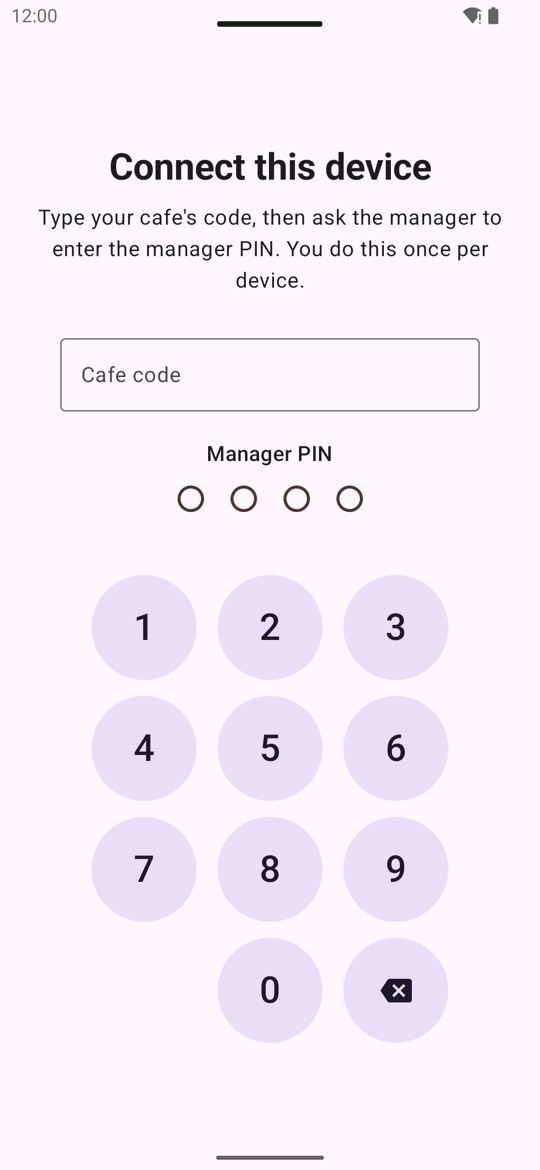
- Tap Install, open the app, and Connect this device: type your cafe code, then the manager enters the manager PIN. You do this once per device.
The web apps (no install)
The same apps work in a browser: …/your-cafe/waiter/ on a phone, …/your-cafe/kitchen/
on a tablet. Handy for an iPhone or iPad, or a spare phone.
- On an iPhone or iPad: Share → Add to Home Screen, so it opens like an app.
- In Chrome: the install icon in the address bar, or ⋮ → Add to Home screen.
- The browser remembers the connection; clearing the browser's data means connecting again with the PIN.
Updates
- Android apps: Settings shows the installed version at the bottom (e.g. Version 0.3.4 · Up to date). When a new one is out, it says Version … is ready; tap it to download and install. If a version is too old to keep working, the app says Update this app to continue and offers the new one.
- Web apps and pages update by themselves; reload the page if something looks out of date.
- Your menu, tables, waiters and look are not "updates": they reach every device within seconds.
Connecting and disconnecting
A device stays connected to your cafe until someone disconnects it, even after a new PIN. To hand a device over or to move it to another cafe: in the web apps, ⋯ or This phone → Disconnect; for an Android app, clear its storage (Android Settings → Apps → the app → Storage → Clear storage). Connecting again needs the manager PIN.
What a screen means
| You see | Means | Do |
|---|---|---|
| Live / Connecting… | Up to date / the connection dropped. | Check the Wi-Fi; it catches up by itself. |
| This cafe is temporarily paused | The cafe's Tablepour service is paused. | Contact the Tablepour team. |
| Update this app to continue | This version is too old. | Install the version it offers. |
| A DEMO tab on the right edge of a page, or a ribbon on an app icon | The Tablepour demo system, for trying it out. Not a live cafe account. | Use the live apps and pages we gave you for real orders. |